Instagram is an amazing social media platform for sharing your life, adventures, and creativity with others. But, one of its biggest drawbacks is its strict photo size limitations. If you’re tired of having to crop your photos and can’t seem to find a way around it, then you’re in luck! In this article, we’ll be sharing a nifty trick that allows you to post full-size photos on Instagram.
What is the Ideal Instagram Size?
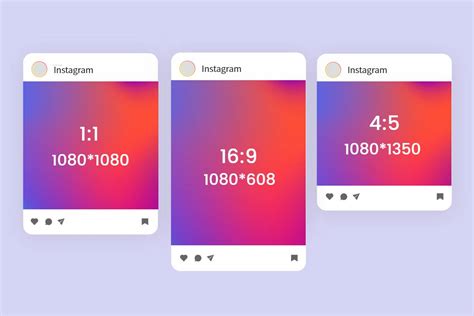
Before we dive into how to post full-size photos, let’s first understand what the ideal Instagram size is. Instagram currently supports square photos with a 1:1 aspect ratio, as well as portrait and landscape photos with a 4:5 aspect ratio. The maximum photo size allowed is 1080 pixels wide by 1350 pixels tall.
The Secret to Posting Full-Size Photos on Instagram
Now, for the moment you’ve been waiting for – how to post full-size photos on Instagram. The secret lies in using the app’s “Multiple Photos” feature. Here’s how:
- Select the photo you want to post and open it in your phone’s default photo app.
- Crop the photo to the desired aspect ratio (1:1 or 4:5).
- Screenshot the cropped photo.
- Open Instagram and select the “+” icon to create a new post.
- Select the screenshot of your cropped photo from your camera roll.
- Tap on the “Multiple Photos” icon in the bottom right corner of the screen.
- Select the original uncropped photo and tap “Done”.
- Now, you’ll see both the cropped and uncropped versions of your photo side by side.
- Drag the cropped version to the left to make it the first photo in the series.
- Tap “Next” and proceed to edit and post your photo as usual.
Other Tips for Posting Great Instagram Photos
Now that you know how to post full-size photos on Instagram, let’s talk about some other tips for making your photos stand out:
- Use natural lighting to capture the best colors and details in your photos.
- Experiment with different angles and perspectives to add visual interest.
- Edit your photos to enhance their colors, contrast, and sharpness.
- Use hashtags to make your photos more discoverable to others.
- Engage with your followers and other Instagram users by leaving thoughtful comments and liking their posts.
The Bottom Line
Posting full-size photos on Instagram doesn’t have to be a headache anymore. By using the app’s “Multiple Photos” feature, you can easily post your photos in their full glory. Remember to also experiment with different angles, lighting, and editing techniques to make your photos stand out. Happy posting!